
Features
Event management from the line-up to the last invoice
Evnty connects what usually lives in five spreadsheets: booking and timetable, budget, shift plan, time tracking and invoices. Every number created in one place is ready in the next.
The modules
Artist booking and line-up
Artist booking
Proposals and team votes, a booking board from hold to contract, a timetable per stage.
Event budget and controlling
Event budget
Categories, plan vs actual, forecast and break-even per event, with alerts and a PDF report.
Crew scheduling
Crew scheduling
Shifts per position, suggestions by qualification and availability, warnings for rest periods and mini-job limits.
Time tracking
Time tracking
Clock in on the portal or a kiosk, even offline, with ArbZG and MiLoG checks, month close and a customs export.
Invoices and SevDesk
Invoices and SevDesk
Documents from SevDesk, uploads or manual entry, with matching suggestions and receipt recognition.
01Everything is connected
A confirmed fee becomes a budget line. A planned shift becomes planned labour cost, an approved hour becomes actual cost. An invoice from SevDesk lands on the line it belongs to. So the budget shows where you really stand, without anyone copying numbers from one list to the next.
02Fixed costs and contracts
Rent, insurance, software and leasing keep running between events. In the contract register you record term, notice period and auto-renewal. Evnty calculates the deadlines and reminds you 60, 30, 14 and 7 days ahead.
The fixed-cost dashboard compares, month by month, what your contracts say is due with the documents that actually arrived, and flags missing payments and price increases.
03Analytics per event, person and organisation
Each event shows budget health, labour cost and hours against plan, coverage, no-shows, overtime, applications and artist costs. For each person you see hours per month, events worked, earnings, punctuality and how close they are to the mini-job and 70-day limits.
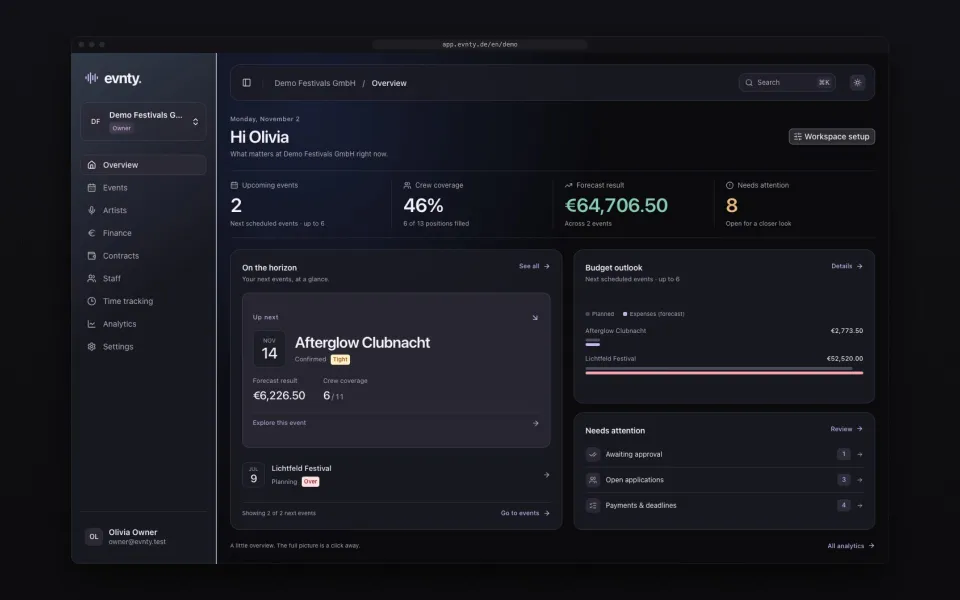
The organisation's home page shows upcoming events, pending approvals, overdue budget lines, this month's fixed costs and upcoming contract deadlines. Each role only sees what it can read elsewhere.
04Roles, security and data in the EU
Owner, finance, booking and HR each see what they need, and individual events can be restricted to specific people. Sign in with a passkey, password or link, and require two-factor sign-in for the whole team. Database and files are stored with Cloudflare in the EU jurisdiction.
05Connect AI assistants
From the Team plan you connect Claude, ChatGPT and other assistants that speak the Model Context Protocol (MCP) to your organisation. They read events, timetables, artists, venues and budget summaries, read-only and only after you approve. More under AI connections.
06German and English
Evnty is available in German and English, switchable per person. That suits mixed crews and international acts.
Questions about the features
Next event already in the calendar?
Put it in Evnty: line-up, budget and the first shift. The team fills in the rest when it's time.