
Invoices and SevDesk
Invoice matching: every document ends up at the right event
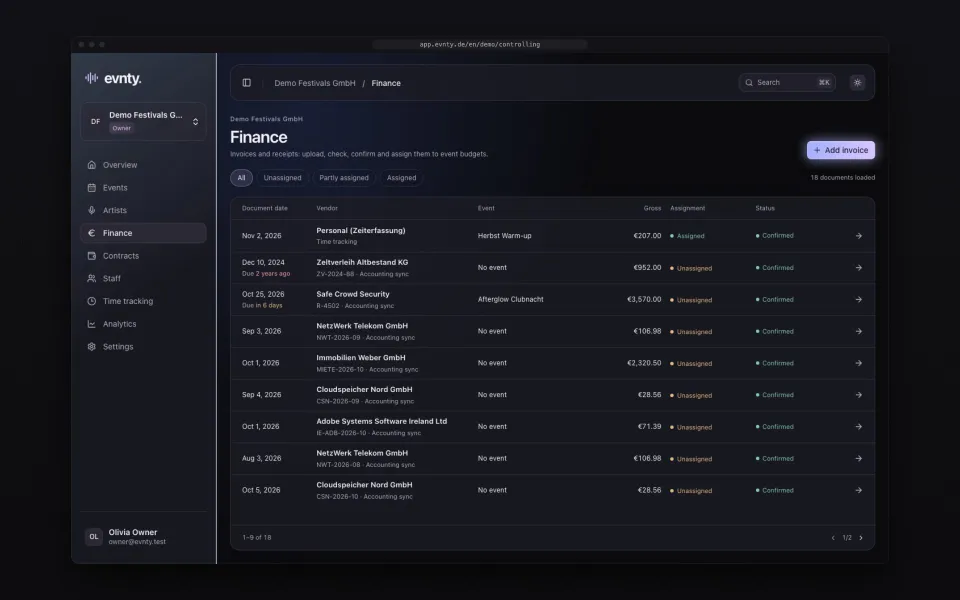
Receipts arrive from SevDesk, by upload or by hand. Evnty suggests the matching budget line and you confirm. What's still open is one click away.
At a glance
- 01A controlling inbox for every document not yet assigned to an event
- 02Automatic SevDesk sync, up to every 15 minutes depending on plan
- 03Assignment to events through SevDesk tags or cost centres
- 04Suggestions by event, vendor, amount and due date
- 05AI receipt recognition pre-fills vendor, amounts and dates (Team plan and up)
- 06Split one invoice across several budget lines and events
01One inbox for every document
Controlling collects every document not yet assigned to an event: from SevDesk, uploaded or entered by hand. Filters show what is open, partly or fully allocated. For each document you see the original file, the recognition status and the allocations.
02Upload and let Evnty read it
You upload invoices as PDF or photo (PNG, JPEG or WebP, up to 25 MB). From the Team plan, receipt recognition reads vendor, invoice number, dates, net, tax, gross and currency and creates a draft. You review and confirm it. A draft cannot be allocated to a budget line.
On the Starter plan, receipt recognition is available as an add-on. Without it, an upload creates an empty draft for you to fill in.
03Connect SevDesk
You connect your SevDesk account with an API token. Evnty checks the token before saving it and stores it encrypted. From then on Evnty fetches expense documents automatically: every four hours on Starter, hourly on Team, every 30 minutes on Pro and every 15 minutes on Business. “Sync now” starts a run immediately, and the history shows every run.
Unchanged documents are skipped. When a document changes in SevDesk, Evnty updates it. If the new amount would fall below what is already allocated, Evnty flags the document for review instead of quietly moving money around.
Amounts, dates and vendor belong to accounting: for SevDesk documents you only edit event and notes in Evnty. A link opens the document in SevDesk.
04Tags and cost centres per event
You link each event to one or more SevDesk tags or cost centres. Documents with that tag or cost centre are assigned to the event, and a tag wins over a cost centre. Evnty recognises the vendor by the contact name.
05Suggestions you only need to confirm
For every document Evnty looks for the matching line in the event budget. The event has to match, plus at least one more reason: the same vendor, a similar amount or a nearby due date. The top three suggestions appear on the document with their reasons. One click allocates the open amount to that line, another dismisses the suggestion.
One invoice can be split across several lines and events, such as the production invoice for a weekend with two events. Evnty never allocates more than the document is worth.
06What's missing stands out
Budget lines that are past their due date with no document allocated are flagged as overdue, with a daily digest to the responsible person.
Recurring documents such as rent, insurance or software are detected and suggested as contracts for fixed costs. The contract register then calculates notice deadlines and flags missing payments and price increases.
Guides on this topic
Guide · Budget
Festival budget
Categories, buffer, committed versus actual costs and the break-even point.
Invoice and SevDesk questions
More features
Artist booking and line-up
Artist booking
Proposals and team votes, a booking board from hold to contract, a timetable per stage.
Event budget and controlling
Event budget
Categories, plan vs actual, forecast and break-even per event, with alerts and a PDF report.
Crew scheduling
Crew scheduling
Shifts per position, suggestions by qualification and availability, warnings for rest periods and mini-job limits.
Time tracking
Time tracking
Clock in on the portal or a kiosk, even offline, with ArbZG and MiLoG checks, month close and a customs export.
Next event already in the calendar?
Put it in Evnty: line-up, budget and the first shift. The team fills in the rest when it's time.