
Artist booking and line-up
Artist booking, line-up and timetable in one app
Your team proposes acts and votes. The booking board tracks every request from hold to contract, the timetable plans each stage with changeovers, and confirmed fees land in the event budget right away.
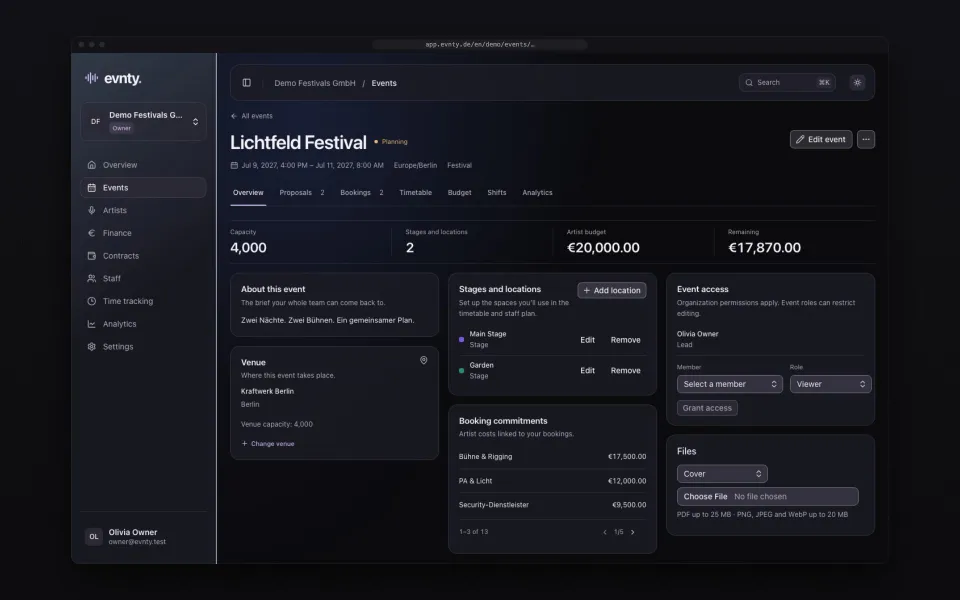
At a glance
- 01Proposals with a pitch and estimated fee, +1 and −1 votes and comments
- 02Booking board with eight statuses from proposal to contract, drag and drop
- 03Holds and offers with an expiry date and email reminders
- 04Confirmed bookings add fee, travel, hotel, KSK and § 50a lines to the budget
- 05Timetable per stage with changeovers and conflict checks, exported as PDF, CSV and iCal
- 06Artist database with contacts, agencies, riders and the fees actually paid
01Proposals and votes: the team decides together
Anyone who proposes an act for an event adds a short pitch and an estimated fee. The team votes +1 or −1 and discusses in the comments. The list sorts by score or by fee and shows how much of the event's artist budget is still available.
When a proposal is accepted, Evnty turns it into a booking. Nobody retypes names, fees and notes into a second list.
02The booking board: every request with its status
Each booking is a card on the board. The columns follow the flow bookers know: proposed, requested, offer, negotiating, confirmed, contracted, declined and cancelled. A card changes status by drag and drop or through a select field that also works with the keyboard.
A booking carries the fee and deal type (flat fee, guarantee or door split), travel, hotel, files and notes. Holds and offers get an expiry date. Evnty reminds the people responsible by email and in the app in good time, so no hold lapses quietly.
03Fees go straight into the budget
As soon as a booking is confirmed or contracted, Evnty creates the budget lines: fee, travel and hotel, plus lines for Germany's artist social levy (KSK) and the § 50a withholding tax on foreign artists when they are set on the booking. You can adjust every line, and your changes stay when the booking moves on.
If a booking is cancelled, Evnty releases the committed amounts in the budget. That way the event budget always shows what the line-up really costs, not the state of the last spreadsheet.
Whether KSK and § 50a apply, and how much, depends on the case. Evnty calculates with your settings but does not replace tax advice.
04Timetable and running order per stage
The timetable shows each stage as its own column. You create slots by dragging, move them and change their length. Besides performances there are soundchecks, changeovers and breaks. Nights past midnight stay one show day, because you set when your day starts.
Evnty checks every change before it is saved. It rejects:
- 01two acts on the same stage at the same time
- 02one act on two stages at once
- 03a changeover shorter than the event's minimum
- 04a slot outside the event days
05Publish and export
The timetable is final when you publish it. Anything you change afterwards stays a draft until you publish again. You export it as a PDF running order for crew and production, as CSV for your own analysis or as an iCal file for any calendar.
06Artist database with history
Every act has a profile with genres, fee range, links, photos, agency or management contacts, riders and press material. The booking history shows when the act played for you and which fees were actually paid. The numbers come from the budget lines, not from memory.
07Work together without overwriting each other
Several people can work on the line-up at once. Evnty shows who is in the event and updates board and timetable live. You decide per event who can see and edit it. Restricted events don't even appear in other people's lists.
For the next edition you duplicate an event: stages, budget structure and shift skeleton come along, bookings and invoices don't. If you use an AI assistant, it can look up line-up and timetable through AI connections, read-only.
Guides on this topic
Guide · Budget
Festival budget
Categories, buffer, committed versus actual costs and the break-even point.
Guide · Timetable
Festival timetable
Set lengths, changeovers, soundchecks, curfew and nights past midnight.
Guide · Booking
Artist booking workflow
Request, hold, offer, deal types, contract, rider, advancing and settlement.
Artist booking questions
More features
Event budget and controlling
Event budget
Categories, plan vs actual, forecast and break-even per event, with alerts and a PDF report.
Crew scheduling
Crew scheduling
Shifts per position, suggestions by qualification and availability, warnings for rest periods and mini-job limits.
Time tracking
Time tracking
Clock in on the portal or a kiosk, even offline, with ArbZG and MiLoG checks, month close and a customs export.
Invoices and SevDesk
Invoices and SevDesk
Documents from SevDesk, uploads or manual entry, with matching suggestions and receipt recognition.
Next event already in the calendar?
Put it in Evnty: line-up, budget and the first shift. The team fills in the rest when it's time.