
For promoters
Promoter software: every show with its deal, budget and break-even
Promoters live on the numbers of each show: the deal with the act, the venue, ticket income and everything in between. Evnty keeps a budget per show, fills it from bookings, hours and invoices, and shows the break-even before the doors open.
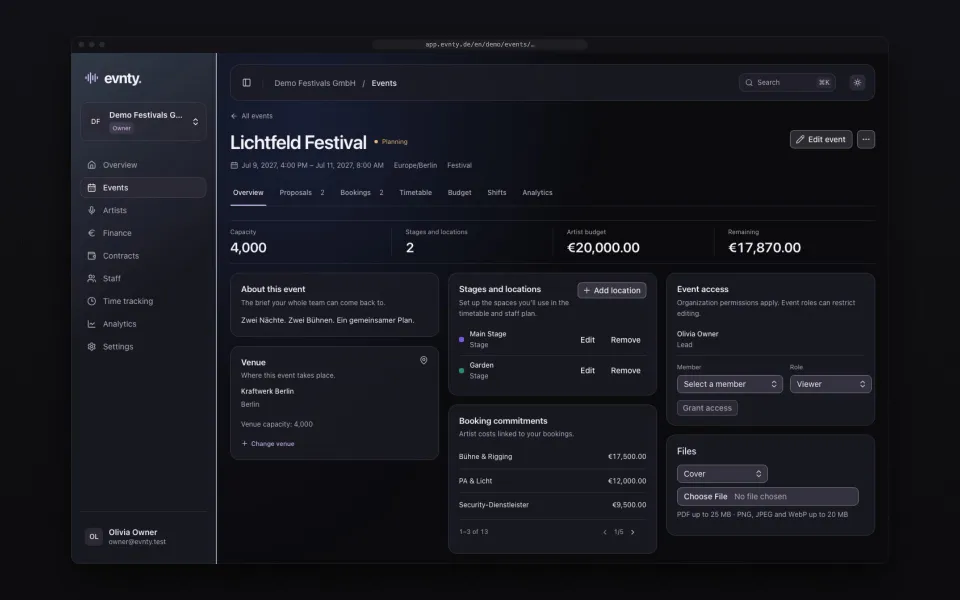
At a glance
- 01A budget per show with planned, committed and actual costs
- 02Deals as flat fee, guarantee or door split, with travel and hotel as their own lines
- 03KSK and § 50a lines for international acts when set on the booking
- 04Result, forecast and break-even from ticket and other income
- 05Invoices from SevDesk matched to the show through tags or cost centres
- 06PDF budget report for partners, co-promoters or funders
01One budget per show
Every show is an event with its own budget lines: artists, venue, ticketing, production, staff, marketing, travel and the other built-in categories, plus your own. Each line has a planned amount, committed and actual costs, a due date and a responsible person. Whether you budget net or gross is set once for the organisation.
02The deal becomes a budget line
A booking carries the deal: flat fee, guarantee or door split. Once it is confirmed, Evnty creates the lines for fee, travel and hotel, plus the artist social levy (KSK) and the § 50a withholding tax on foreign artists when they are set on the booking. If the show is cancelled, the committed amounts are released.
Whether KSK and § 50a apply, and how much, depends on the case. Evnty calculates with your settings but does not replace tax advice.
03Break-even before the doors open
Above the budget table sit the show's key figures: planned and actual costs, forecast, income, the expected result and the break-even, meaning how much of the expected costs your income already covers. Every line and category has a traffic light, with alerts at 90 % and 100 % of plan by default.
Before the on-sale you freeze the approved plan as a baseline. Afterwards you see where and why the show got more expensive. Details under event budget.
04Invoices land on the right show
Invoices arrive by upload, by hand or from SevDesk. You link each show to a SevDesk tag or cost centre, and documents with it land on the show. Evnty suggests the matching budget line by vendor, amount and due date, and you confirm. One production invoice can be split across several shows.
Budget lines past their due date without an invoice are flagged, with a daily digest to the person responsible. More under invoice matching.
05Line-up and running order
Proposals, votes and the booking board work for a single headliner as well as for a full bill. The timetable plans each stage with soundchecks and changeovers and goes out as a PDF running order. Details under artist booking.
06Crew for the show
Whether you bring your own crew or work with freelancers, shifts are planned per position and Evnty applies the checks that fit each employment type. Freelancers, for example, are exempt from the minimum-wage check. See crew scheduling.
07Several shows at once
Plans differ by how many events are active at the same time. Restricted events only appear for the people you add, so a show still in negotiation stays with the people working on it. With AI connections, from the Team plan, an assistant such as Claude can read a show's budget summary for you, read-only.
The features behind it
Event budget and controlling
Event budget
Categories, plan vs actual, forecast and break-even per event, with alerts and a PDF report.
Artist booking and line-up
Artist booking
Proposals and team votes, a booking board from hold to contract, a timetable per stage.
Invoices and SevDesk
Invoices and SevDesk
Documents from SevDesk, uploads or manual entry, with matching suggestions and receipt recognition.
Crew scheduling
Crew scheduling
Shifts per position, suggestions by qualification and availability, warnings for rest periods and mini-job limits.
Promoter questions
More solutions
For festivals
Festivals
Several stages, a large crew and a budget that moves: timetable, shifts, offline clocking in and budget control.
For clubs
Clubs
A night every weekend: residents and guests, bar and door shifts, hours under MiLoG and fixed costs in view.
For event agencies
Event agencies
Many client events side by side: a budget per event, cost centres, access per project and freelance crew.
Next event already in the calendar?
Put it in Evnty: line-up, budget and the first shift. The team fills in the rest when it's time.