
SevDesk integration
SevDesk integration: every voucher on the right event
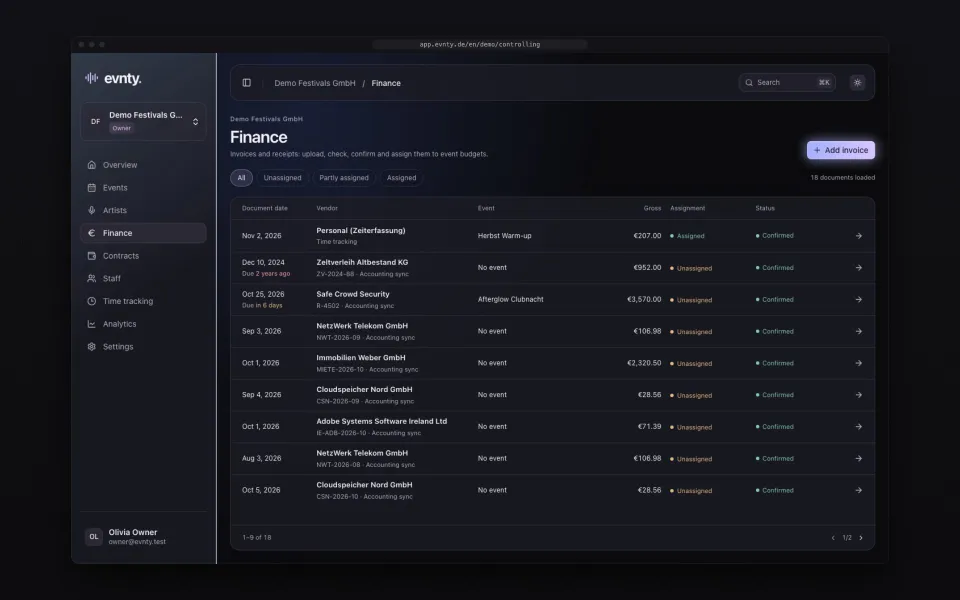
Connect SevDesk once with an API token. Evnty then fetches booked expense vouchers on a schedule, assigns them to events by tag or cost centre and suggests the budget line they belong to. Nothing is written back to SevDesk.
At a glance
- 01Connect with a SevDesk API token, checked before saving and stored encrypted
- 02Automatic sync from every four hours on Starter to every 15 minutes on Business
- 03Booked vouchers only: open, partly paid and paid; drafts are skipped
- 04Events linked to SevDesk tags or cost centres; a tag wins over a cost centre
- 05Suggestions for the matching budget line, allocated with one click
- 06Read-only: Evnty never changes anything in SevDesk
01Connect with an API token
In SevDesk you create an API token under Settings → Users → API token and paste it into the integration settings in Evnty. Evnty checks the token with SevDesk before saving it and stores it encrypted. It is never shown again.
If SevDesk rejects the token later, the connection shows the error and you enter a new one. If SevDesk is unreachable or limits requests, the next run retries on its own.
02What Evnty fetches
Evnty reads vouchers dated within the last 18 months, plus older ones that are still unpaid. Only booked vouchers count: open, partly paid and paid. Drafts are skipped, because they are not booked in accounting yet. For each voucher Evnty takes:
- 01supplier, description, voucher date, due date and payment date
- 02net, tax and gross amount with the currency
- 03tags and cost centre
- 04the recurring interval, used to suggest contracts for fixed costs
03Sync on a schedule, or right now
Evnty syncs automatically: every four hours on Starter, hourly on Team, every 30 minutes on Pro and every 15 minutes on Business. Team and Pro can add 15-minute syncing as an add-on. “Sync now” starts a run at any time, and the history lists every run.
Unchanged vouchers are skipped. When a voucher changes in SevDesk, the next run updates it in Evnty.
04Tags and cost centres decide the event
You link each event to one or more SevDesk tags or cost centres. A voucher with that tag or cost centre is assigned to the event, and a tag wins over a cost centre. Evnty recognises the vendor through the SevDesk contact, which also drives the suggestions.
05From voucher to budget line
For every expense voucher Evnty suggests up to three budget lines of the event, based on vendor, amount and due date. One click allocates the open amount. A voucher can be split across several lines and events, never beyond its total. More under invoice matching and event budget.
06SevDesk stays the source
Amounts, dates and vendor belong to accounting: for SevDesk vouchers you only edit event and notes in Evnty, and a link opens each voucher in SevDesk. If a new amount in SevDesk falls below what is already allocated, Evnty flags the voucher for review instead of moving money on its own.
SevDesk is mainly used in Germany and Austria. Organisations in Switzerland often work with bexio, which Evnty does not connect to. Their documents can be uploaded as files.
SevDesk questions
More connections
MCP
AI connections
Claude and ChatGPT read your events over MCP
Next event already in the calendar?
Put it in Evnty: line-up, budget and the first shift. The team fills in the rest when it's time.